
What Spice Blocks Are?
Spice blocks are basically Gutenberg based blocks with advance features. Spice blocks provide advance settings…
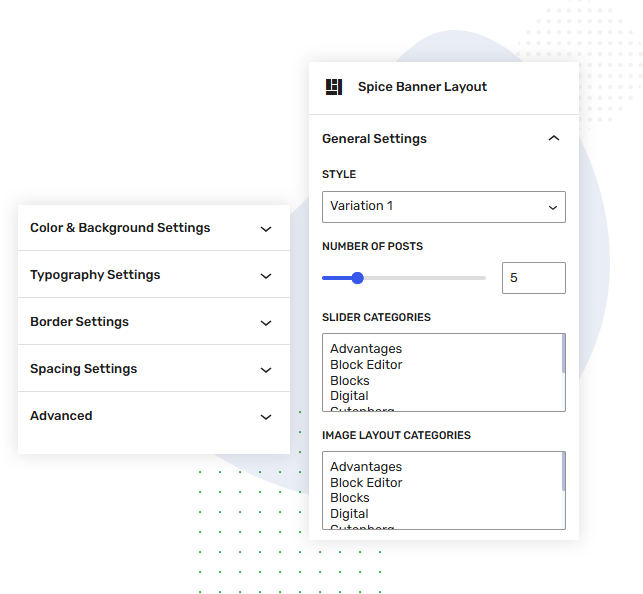
Customize your website’s banner sections effortlessly with the Banner Layout block. Choose your preferred layout variation, control the number of posts, and display content from specific categories using flexible slider and image layout settings. With easy-to-use customization options, you can create engaging, well-organized banner sections that highlight your most important content and enhance your website’s overall visual appeal and user experience.
Spice blocks are basically Gutenberg based blocks with advance features. Spice blocks provide advance settings…

Create your dream website with a powerful visual website builder called spice block. Spice blocks…

Spice block has been released and is now available for all users. It’s fully loaded…

In addition to the Gutenberg block editor Spice blocks comes with many useful block and…

The goal for the WordPress block editor was to create a more visually intuitive experience…
Spice blocks are basically Gutenberg based blocks with advance features. Spice blocks provide advance settings…
Create your dream website with a powerful visual website builder called spice block. Spice blocks…
Spice block has been released and is now available for all users. It’s fully loaded…
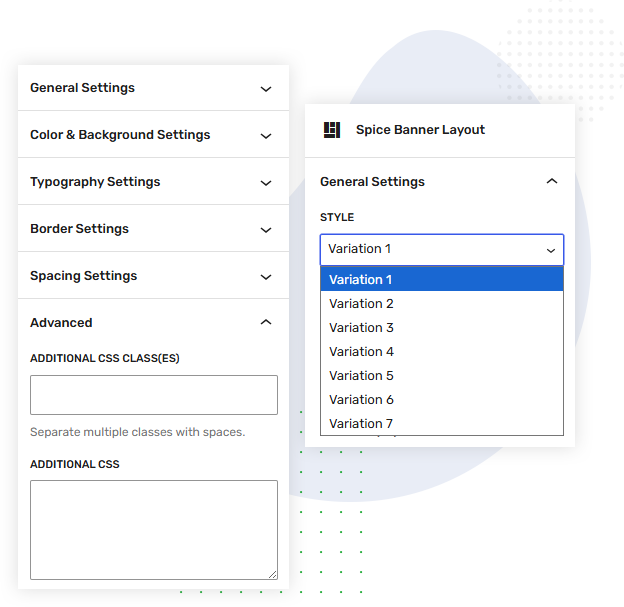
The Banner Layout block comes with 7 unique design variations, each crafted to suit different website styles and banner requirements. Whether you need a bold, modern layout or a clean and minimal design, you can choose the variation that best fits your website. Every layout is fully responsive, ensuring your banners look great and work seamlessly across desktops, tablets, and mobile devices, providing a consistent and engaging experience on every screen size.
Spice blocks are basically Gutenberg based blocks with advance features. Spice blocks provide advance settings…
Create your dream website with a powerful visual website builder called spice block. Spice blocks…
Spice block has been released and is now available for all users. It’s fully loaded…
In addition to the Gutenberg block editor Spice blocks comes with many useful block and…
The goal for the WordPress block editor was to create a more visually intuitive experience…
Spice blocks are basically Gutenberg based blocks with advance features. Spice blocks provide advance settings…
Create your dream website with a powerful visual website builder called spice block. Spice blocks…
Spice block has been released and is now available for all users. It’s fully loaded…
In addition to the Gutenberg block editor Spice blocks comes with many useful block and…
The goal for the WordPress block editor was to create a more visually intuitive experience…
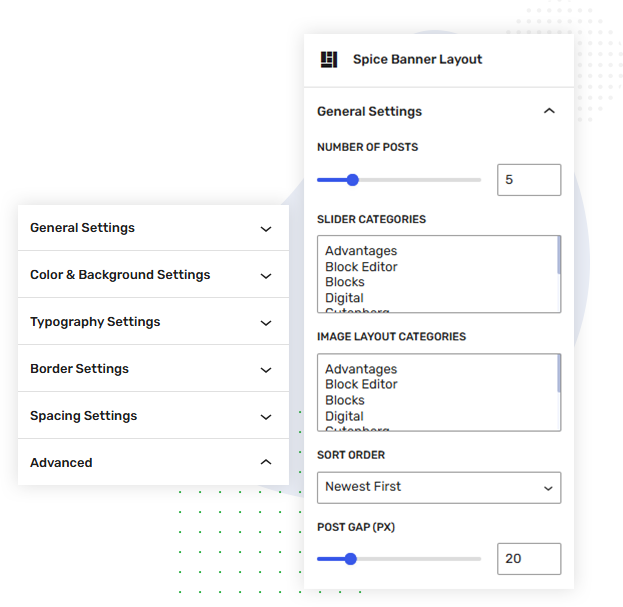
The Banner Layout block gives you complete control over the content displayed in your banner slider. You can easily set the number of posts to show in the slider, select specific categories for slider content and additional image layouts, and choose the preferred sort order for your posts, such as newest first. These flexible options make it easy to display the right content in the right place while keeping your banner section organized, relevant, and engaging.
Spice blocks are basically Gutenberg based blocks with advance features. Spice blocks provide advance settings…
Spice blocks are basically Gutenberg based blocks with advance features. Spice blocks provide advance settings…
Create your dream website with a powerful visual website builder called spice block. Spice blocks…
Spice block has been released and is now available for all users. It’s fully loaded…
In addition to the Gutenberg block editor Spice blocks comes with many useful block and…
The goal for the WordPress block editor was to create a more visually intuitive experience…

Gutenberg is a brand new editor for WordPress for creating website pages, products, posts, and…
Create your dream website with a powerful visual website builder called spice block. Spice blocks…
Spice block has been released and is now available for all users. It’s fully loaded…
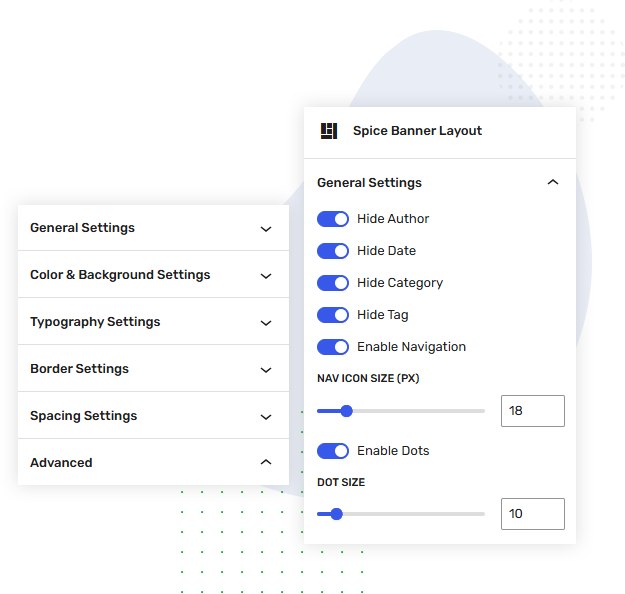
The Banner Layout block provides flexible display and navigation controls to fine-tune your banner experience. You can adjust the post gap to control spacing between posts, choose whether to show or hide the author, date, category, and tags, and enable navigation controls for easier slider browsing. You can also customize the navigation icon size, enable dots navigation, and adjust the dot size to match your website’s design. These options give you complete control over the banner’s appearance, spacing, and navigation behavior.
Spice blocks are basically Gutenberg based blocks with advance features. Spice blocks provide advance settings…
Spice blocks are basically Gutenberg based blocks with advance features. Spice blocks provide advance settings…
Create your dream website with a powerful visual website builder called spice block. Spice blocks…
Spice block has been released and is now available for all users. It’s fully loaded…
In addition to the Gutenberg block editor Spice blocks comes with many useful block and…
The goal for the WordPress block editor was to create a more visually intuitive experience…
Gutenberg is a brand new editor for WordPress for creating website pages, products, posts, and…
Create your dream website with a powerful visual website builder called spice block. Spice blocks…
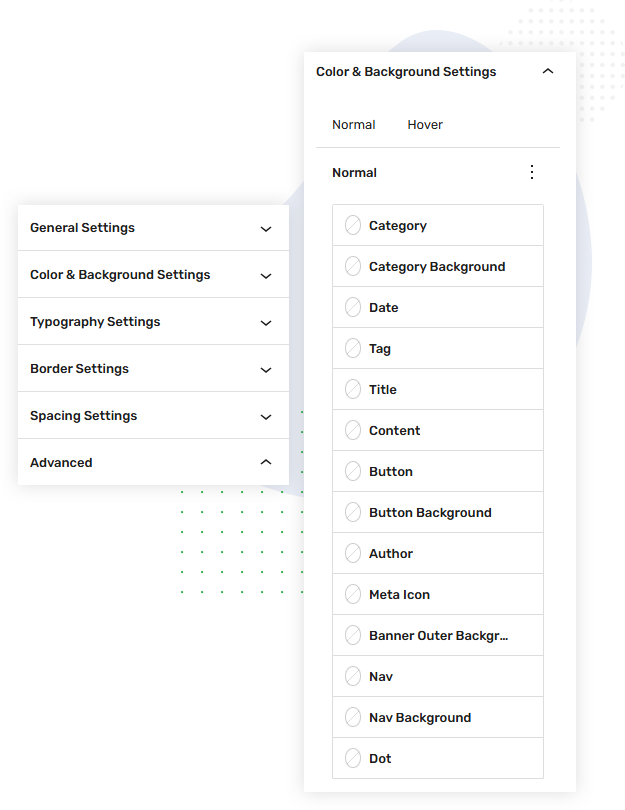
The Color & Background Settings give you detailed control over the appearance of different elements in your banner. You can customize styles separately for Normal and Hover states, allowing you to create engaging visual interactions. The block provides individual color and background controls for elements such as category, date, tag, title, content, button, author, navigation, dots, and banner background. This level of customization helps you easily match the banner’s colors, hover effects, and overall design with your website’s branding.
Spice blocks are basically Gutenberg based blocks with advance features. Spice blocks provide advance settings…
Create your dream website with a powerful visual website builder called spice block. Spice blocks…
Spice blocks are basically Gutenberg based blocks with advance features. Spice blocks provide advance settings…
Create your dream website with a powerful visual website builder called spice block. Spice blocks…
Spice block has been released and is now available for all users. It’s fully loaded…
In addition to the Gutenberg block editor Spice blocks comes with many useful block and…
The goal for the WordPress block editor was to create a more visually intuitive experience…
Gutenberg is a brand new editor for WordPress for creating website pages, products, posts, and…
Spice block has been released and is now available for all users. It’s fully loaded…
In addition to the Gutenberg block editor Spice blocks comes with many useful block and…
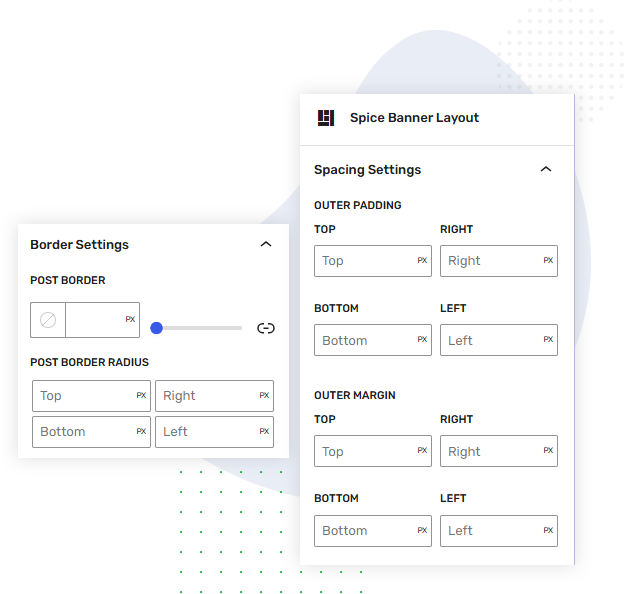
The Border & Spacing Settings give you precise control over the banner’s structure and overall layout. You can customize the post border, adjust the border radius independently for the top, right, bottom, and left sides, and create the exact visual style you need. The Spacing Settings allow you to control outer padding, outer margin, and navigation margin with individual values for each side. These flexible spacing controls make it easy to manage the distance around posts and navigation elements, ensuring a clean, balanced, and well-aligned banner across different layouts.
Spice blocks are basically Gutenberg based blocks with advance features. Spice blocks provide advance settings…
Create your dream website with a powerful visual website builder called spice block. Spice blocks…
Spice block has been released and is now available for all users. It’s fully loaded…
In addition to the Gutenberg block editor Spice blocks comes with many useful block and…
The goal for the WordPress block editor was to create a more visually intuitive experience…
Gutenberg is a brand new editor for WordPress for creating website pages, products, posts, and…
